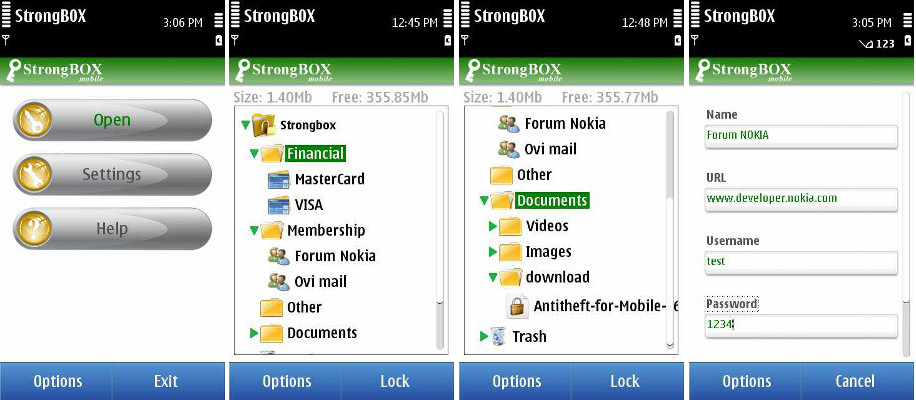
What is Mobile StrongBOX?
Mobile StrongBOX is designed to protect your entire phone's data. The application uses a strong public-key crypto-system that is optimized for mobile devices.
Mobile StrongBOX uses strong 256-bit AES (Advanced Encryption Standard) encryption for data and 1024-bit RSA encryption for keys. All cryptographic operations are performed using standard NOKIA libraries to ensure there are no security gaps or backdoors.
Any kind of information can be secured with Mobile StrongBOX. It does not only protect your data but also helps you if you have many things to memorize like passwords and credit card PINs. With Mobile StrongBOX you will not have to worry about these things any more!
Storing passwords, PINs, credit cards info, membership, login credentials etc. is now very easy and safe. SMS-es, MMS-es, files and folders can also be added to strongbox, keeping the hierarchical structure of folders(for example you can encrypt your private photos and videos so no one else can view them). Other developers offer some of these features in 2 or 3 different products, with Mobile StrongBOX you have them all in a single one, all data in a single secure place.
Key features: 256 AES + 1024 RSA, user-friendly interface, fully customizable templates(add/remove/rename/move fields), multiple files/folders import/export in one operation, no export needed to view the files(view them directly from strongbox), secure erasing of imported files ( if user wants to), copy/paste,arrange items however you like with move function, search function, auto-lock, multiple strongboxes, import data from CSV files, backup/restore, trash.
With Mobile StrongBOX you have your private information in your pocket anywhere, ON-THE-GO.
Mobile StrongBOX does not use license keys, so you pay once and use forever!!
GET THE FULL AD-FREE VERSION NOW!
For much more information, please read the User Guide or go to Support Thread
A complete list of supported devices can be found here.

 Mobile StrongBOX has been granted the "Famous Software Award" from download.famouswhy.com
 Famous Interview
The ad-powerred free full version is available now at OVI store!!
Download here
Current version in Ovi store: 2.46.12
The Android version is under development!!!
Friday, February 4, 2011
FamousWhy interview
FamousWhy.com have just published an interview with me. It can be read here: http://download.famouswhy.com/publisher/alin_coman/

Friday, January 28, 2011
Opening large video files in v2.41
With Mobile StrongBOX you can encrypt any file, including large videos. Also you can view the encrypted files direclty inside the app... although for a large file, this will take some time for the file to be decrypted. In version 2.41 when opening such a large file directly from the app (not when exporting) the application seems to freeze, but actually DOES NOT freeze, it decrypts the large file and after some time (depending on the file's size) it will display the file! Because I hurried to publish the app on Ovi, I did not put this decryption proccess on a separate thread to be able to display a progress bar (like I did with import/export). Anyone who know Symbian programming knows that in order to display a progress bar on the screen and not to block the main thread, for a long time proccess, it must be implemented with active objects or separate threads( I prefer threads because of performance reasons).
This will be implemented in the next version!
This will be implemented in the next version!
Monday, January 24, 2011
How to best protect your private data (encryption vs anti-virus vs anti-theft)
Nowadays, internet access on mobile phones exposes personal data to hazards. Although viruses for mobile phones are at the beginning (there are viruses even on Symbian,just search the specialized forums!), soon it will be a very attractive area for virus writers. Unfortunately, being a new field, anti-virus programs can not offer 100% protection, because, for example, it takes time to find an antidote for a virus. Until then, the virus will be stolen your personal data.
Another situation when your data can be stolen is when you lose your phone. Anti-theft programs can not ensure 100% data security, simply because it may be too late when you'll realize that you lost your phone!
So, I think that the best solution for your data security is encryption : even if your data get into the wrong hands it will be useless, because the data can not be seen!
Another situation when your data can be stolen is when you lose your phone. Anti-theft programs can not ensure 100% data security, simply because it may be too late when you'll realize that you lost your phone!
So, I think that the best solution for your data security is encryption : even if your data get into the wrong hands it will be useless, because the data can not be seen!
Saturday, January 15, 2011
Importing Best Safe data
I have finished implementing a feature that will help the user to import his data from Best Safe program into Mobile StrongBOX. To start the import process, please open the strongbox and select 'Import CSV file' from Option menu. A browser displaying the phone's memory drives will be shown, to let you select the .csv file exported by Best Safe. Select it and press 'OK'.
This feature will be available from version 2.45 up!
Please let me know if you consider this a good/useful feature and if any other program exports plain data (decrypted) !
Thanks!
This feature will be available from version 2.45 up!
Please let me know if you consider this a good/useful feature and if any other program exports plain data (decrypted) !
Thanks!
Thursday, January 13, 2011
"Famous Software Award" by Download.FamousWhy.com
Mobile StrongBOX (http://download.famouswhy.com/mobile_strongbox/)" has been granted the "Famous Software Award" by Download.FamousWhy.com.
The Famous Software Award has been initiated by Download.FamousWhy.com to recognize "Famous Software", which come up with innovative and efficient ways to reflect the best relationship with users assuring their satisfaction.
The Famous Software Award has been initiated by Download.FamousWhy.com to recognize "Famous Software", which come up with innovative and efficient ways to reflect the best relationship with users assuring their satisfaction.
Why is Mobile StrongBOX secure?
First of all, because it uses both 256-bit AES (Advanced Encryption Standard - widely used) and 1024-bit RSA.
Second, because of the way it uses these algorithms : the private content is not encrypted with your single password (like many other software do), let me explain how it works. Your password is NOT stored anywhere, it is MD5 encrypted (nor this encrypted value is stored) so even your password is 2-3 chars long ,the actual password is 256-bits long (32 chars) making brute-force attacks useless.
This is what happens when you add data to your strongbox : a session key of 256 bits is generated, using large random numbers (the generation algorithm has a very good dyspersal), every time any data is encrypted. This session key is the actual key used by the AES for encryption of data. This key is also RSA encrypted with 1024-bit public key of the strongbox owner, thus ensureing that it can be decrypted with the PRIVATE KEY of the strongbox owner ONLY !! The PRIVATE and PUBLIC keys are generated (using NOKIA algorithms) when the strongbox is first initialized and they are 256-bit AES encrypted with the MD5-encrypted(hashed) user password.
Second, because of the way it uses these algorithms : the private content is not encrypted with your single password (like many other software do), let me explain how it works. Your password is NOT stored anywhere, it is MD5 encrypted (nor this encrypted value is stored) so even your password is 2-3 chars long ,the actual password is 256-bits long (32 chars) making brute-force attacks useless.
This is what happens when you add data to your strongbox : a session key of 256 bits is generated, using large random numbers (the generation algorithm has a very good dyspersal), every time any data is encrypted. This session key is the actual key used by the AES for encryption of data. This key is also RSA encrypted with 1024-bit public key of the strongbox owner, thus ensureing that it can be decrypted with the PRIVATE KEY of the strongbox owner ONLY !! The PRIVATE and PUBLIC keys are generated (using NOKIA algorithms) when the strongbox is first initialized and they are 256-bit AES encrypted with the MD5-encrypted(hashed) user password.
Wednesday, January 12, 2011
Why Mobile StrongBOX uses RSA?
Because it implements a hybrid crypto-system to increase the security level and because future versions will support encrypted data exchange between devices. For example the user will be able to send private documents to a contact via email or SMS/MMS. RSA is good for this because all the application must know is the public key of the recipient.
Subscribe to:
Posts (Atom)